Subscribe:

Ads 468x60px

Showing posts with label Tips and Trick. Show all posts

Sunday, February 16, 2014

Cause Smartfren Very Slow

http://udugscell.blogspot.com/2014/02/cause-smartfren-very-slow.html
For you who frequently access the Internet with Smartfren surely know, as the operator of this one was better known as a company that often offers a data package to access the internet. Even the ads on television, Smartfren further highlight its data access services and sms than phone service. One thing that characterizes this operator is i Hate Slow, or anti-slow.

Unfortunately, what they turned into a slogan backfired. Since the past few days Smartfren often slow when used to access the Internet. If the condition is rain might still be understandable, because the signal will be less good. But the problem smartfren often slow when used to access the internet on his notaben place in good condition.

After investigation, ultimately causing his slow Smartfren is a surge in user traffic or at a point or area. Moreover, the cause of the largest CDMA service provider in Indonesia less than the maximum is also caused by the transfer of traffic that can not be steeper on a Route. According to the Director Smartfren Merza Fachys, network slow due to the surge in traffic at some point and can not be transferred to another route because of flooding.

As is known, in some areas in Indonesia now is the middle of the great flood. And it is indeed quite disturbing signals, especially heavy rain that kept pouring it somewhat troublesome enough Smartfren company in overcoming its slow their network. Usually traits - traits that slow Smartfren used to access the Internet is a signal that sometimes - sometimes disappear from the status bar signal.

To overcome this, now Smartfren trying several steps in order to strive for their data access network is not slow anymore. But unfortunately, until now there is no sign - a sign of change for the better, even in some areas Smartfren still severely impaired when it is used for accessing the internet.

Monday, February 3, 2014

Nokia Asha 205 Local Mode Because Wrong Firmware

Nokia Asha 205 Local Mode Because Wrong Firmware --- Here I want to share information about local mode occurred in the Nokia Asha 205. yesterday I found this kind of problem I am confused as to how to cope with it. well on this occasion I wanted to share the experience with your tastes all about it. well for those of you who have experienced things like this please you to read the following article, Why My Nokia Asha 205 Local Mode?
http://udugscell.blogspot.com/2014/02/nokia-asha-205-local-mode-because-wrong.html
The Cause of the Nokia Asha 205 Local Mode

Errors Select Rm-863 or Rm-862. This usually occurs after the flashing complete of then the local mode. yesterday i tried to flash Nokia Asha 205 using jumper cables. jumper cables to see it here. when completed in flashing Nokia Asha 205 local mode on screen display. I need a few hours to find a solution how to cope with the local mode. I finally found the solution in one of the blogs and forums they said it was a mistake choosing Rm, if you try that before you enter Rm-863 please re-flashing using Rm-862 and vice versa.

The only information that I can say on this occasion. I hope that the information about the Nokia Asha 205 local mode after flashing completed. good luck

Tuesday, January 21, 2014

How to Flashing Nokia Asha 205 with USB Cable Jumper

Here we would like to share the information with you all about how easy to root or flashing Nokia Asha 205. on Nokia Asha 205, there are 2 versions of the firmware, the firmware is actually the same but only on its a different Rm type. to find it, please read the instructions on the Analysis Of Mobile below.
how to flashing nokia asha 205 with usb

Trick Jumper Pinout USB Cable Directly to the Phone Board

  1. Attach the USB cable directly to the phone such as the picture above board. NOTE : make sure the jumper cables are not connected to each other, this will result in your computer cannot identify the mobile
  2. Connect phone to your computer via USB
  3. Select firmware Rm-863 or Rm-862, Nokia Asha adjust the version you are using
  4. Put the firmware such as MCU, PPM, CNT. If you do not have please search first provider of firmware free on google.
  5. When all is done just the way you are right flashing.

Tips and Warning

If you enter the wrong firmware will cause the phone to Local Mode. because I never experienced a firmware error and phone to local mode.

The only information of Analysis Of Mobile on how to flash the Nokia Asha 205 using a USB cable jumper. I hope this information can help you trouble.

Sunday, January 12, 2014

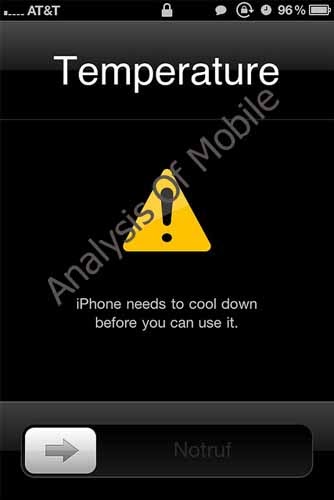
Why Fast Mobile Hot ? and How to Overcome Them

Analysis Of Mobile --- Typically, mobile users feel the awkwardness when using a cell phone hot. Excessive heat on the phone certainly cause discomfort during use. Ya you need to know what causes the phone to heat up quickly so that preventive action before we phone fever getting worse.
http://udugscell.blogspot.com/2014/01/why-fast-mobile-hot-and-how-to-overcome.html

Any misuse

Of course, too often use your cell phone for sms's fun, phone, listen to music and surf will cause overheating because the processor, GPU, RAM is required to work harder which in this case requires more energy than batteries. Make the best use of your cell phone wisely, lest energy memforsir your mobile phone, in addition to causing the battery to run out quickly and hot, it also causes your phone 'retirement' faster. Use in duration, eg 2 x 2 hours better than to use 1 x 4 hours

The weather is hot

The state of the rooms were hot and high temperatures also berpengaruhterhadap phone . Temperatures will carry cell phones with temperatures around . To avoid this , use your gadgets in a cool ( just like when you use a laptop or a computer that requires the fan to stabilize the temperature ) . Use your finger to hold , not your hands because the temperature of the palm of the hand will make the gadget heats .

The signal intensity

If you are using the gadget in a low signal is used especially for surf , heat will speed up your phone because the phone is still working to find a signal . Use mobile phones to surf in places that are you sure there is enough signal . Too forced to use the network ( 3G/WCDMA Only for example ) can also make a quick phone network in the heat if you are more stable in 2G/EDGE s . Use a suitable network .

The number of applications running simultaneously

Many times we let some applications still running "behind the scenes " or in the background . This causes rapid heat occupational gadget multitasking sometimes even partially use. We recommend using the button / softkey "back " or the " exit " after using the application . Using the "Home" button to close the application causes the application running behind the scenes that will weigh on the performance of the processor .

Damage to the Battery

Batteries are too often used is usually damaged or worn . The signs are usually battery could be bloated even discharge from the battery . If your battery is damaged , replace it immediately because otherwise it can cause other damage to your phone and do not forget to buy the original to ensure its quality .

Only information from us about how to cope with a cell phone to excessive heat. This article may be useful to you all. Thank you for visiting the blog Analysis Of Mobile.

Sunday, October 6, 2013

How to Use the Android Smartphone as a Wi-Fi

How to Use the Android Smartphone as a Wi-Fi --- For users of Android smartphone operating system must already know the advantages offered by the device. In addition, supported by millions of free apps, and apparently paid Android smartphone can also be used as a Wi-Fi running. Although not all Android phones are supported by this feature, but it seems in the year 2013, 99% of the outstanding android phones can already be made in Wi-Fi running. Feature is owned by the smartphone with the Android Froyo operating system minimum. If you have a mobile phone operating system Android Froyo or more, can use as wi-fi android smartphone.

Tips following for Use the Wi-fi Android Smartphone

  • Go to the Settings menu
  • Click the Wireless & Network
  • Click the Tethering & Portable Hotspot
  • If you want to maintain the security of Wi-Fi access on your phone, you can increase the security of Wi-Fi access by clicking on the Mobile AP settings or some other type of menu is the android phones Portable Wi-Fi hotspot settings.
  • Select Configure mobile AP
  • In this section you will not only be able to give a password on your Wi-Fi access , but you can also change the name of the Wi - Fi on your phone by changing the network SSID .
  • At the bottom there is a menu SSID network security . Click the menu and then select the WPA2 PSK security if you want to give the password .
  • The name of the password that you want but if you allow anyone to access the Wi - Fi you have it on the security of open pick .
  • The next step you do is set up Wi - Fi passwords on your phone .
  • To provide the Wi- Fi password you must type at least 6 characters . If you want a stronger defense you can use a combination of numbers and letters as well as a slightly longer passwords .
  • Tick ​​the menu Portable Wi - Fi hotspot or on some other types of mobile phones such as Android phones that I use select Mobile AP .
  • The last step you do is browse the network to other devices with Wi - Fi access have your android smartphone .
Maybe that's all of the information about the Analysis Of Mobile Wi-fi Android Smartphones.

How to Resolve Android Phones and Gadgets That Slow.

How to Resolve Android Phones and Gadgets That Slow --- For users of Android-based phones, this phone is a versatile mobile phone. With this phone users can play mp3, video, open internet, see tv streaming etc.. So the android phone users vying to improve the performance of their android phones.

However, if the android phone having slow in responding or slow it will make the activity using android phone to crash. Many factors that cause your android phone to be slow and coupled with the condition of your android has a lower spec make your android slow. In the article I will give you tips to overcome android phone slow or slow.
Instructions
There At The Cache Erase Internal Memory
This cache is a temporary file folder handy gives you quick access any time it opened a site that has been stored in the cache. And the effects that often make your phone slow is too much cache memory is stored in your phone system. To eliminate these effects is quite easy to please clear your cache history. With a few simple steps can make your android is not slow anymore.

Avoid the use of applications and games at the same time
It is undeniable android has the ability to run many applications simultaneously. However, this advantage causes your android phone easily experienced slow or slower. Avoid application to open it with, in addition to can not make your phone slow can also save your battery power.

Avoid use Live Wallpaper on your Android Phone
Live Wallpaper is an application provided to beautify the look of your Android wallpaper. However, these applications give unfavorable effects to your phone. Your phone will feel heavy and slow when run in response. To maintain the performance of your android still excellent use wallpaper as usual that does not make your phone slow.

Choose an external memory to accommodate the programs want to installed
When you download and install the application into your phone normally storage will be automatically entered into the internal memory of your phone. Reset your storage settings, try to be moved to external memory of course, with a larger capacity. Because of the existing capacity in less internal memory. And when trying to save a file for input into the external memory.

Alternately time running applications
Although Android has multi-tasking advantage alternately try to use the mobile phone to avoid slow. Here are some tips to overcome slow Android phones may help you android fans to be able to improve the performance of your android phone.

Thank you for visiting this blog that discusses about how to speed up the Android-based phones

How to Create a Transparent Sms in Android

The latest information about android --- Much can be done on Android-based phones. The users can manage their own Android phones so we get a very slick look and sophisticated look. Android is still much in demand by the public. Even as his fame, many mobile phone vendors have emerged and compete launch Android phones. Various interesting or cool feature found on Android among others, making wallpaper display screen comes alive (live), creating a colorful display screen, to make the display transparent SMS. Amazing is not it? Moreover, due to the transparent SMS has not previously encountered such a feature. And this time I will discuss about the things that make the display transparent SMS on Android phones. This is an example of a transparent display picture SMS Android.

Transparent Sms in Android

  • Requirements that must be met when you want them transparent SMS on Android phones is having Root Explorer app . If you do not have Root Explorer then you should first download on the internet .
  • If you already have Root Explorer then immediately entered in the application .
  • Click on Mount R / W , and change the option to Mount R / O.
  • If it is so then go to Drive / system / app / and find mms.Here you have to pay attention to the license ( permission ) of the application. In fact, you also have to memorize it . Copy ( copy and paste ) to SD card for backup .
  • Subsequently switched to SD card. Go to the drive and search Mms - Transparent - NB.zip and Extract the zip file.
  • Next step is to look for mms.apk that has been extracted earlier . Copy and paste to Drive / system / app / . You have to change the name but equate permissions as the original mms.apk permission .
  • Root Explorer check and make sure you stick to the mode Mount R / O
  • The last step is to reboot your Android phone SMS feature transparent then you'll get.
The only information about the Analysis Of Mobile applications based on android

Saturday, October 5, 2013

How to Care for a Longer Lasting Android Battery

Android phone user you should know trivial things like the battery is weak, the battery does not last long, or are easily damaged. well on this occasion we Analysis Of Mobile wants to share tips and tricks on how to care for android battery to last longer.

The following tips and tricks on how to keep android battery last longer.

Wait a completely charged battery 
If you do phone charging . Never carried out in a state charging system unused / used . Recharge properly and wait till the battery is completely charged full ( 100 % ) . This is very important , as a result of during charging , the battery device you'll take in warmth from the battery energy so that you will feel the warmth . When you use your device whereas charging , heat acquired will double your battery . And this isn't good to your battery efficiency .

Modify the room temperature 
temperature of between zero to forty five levels is ideal for charging your battery situation . Extra and less than it would endanger the well being of your battery . Preserve your gadget away from direct beam daylight and other warmth sources .

Battery free 
This is associated to the 2 steps above . Whenever you make the filling , you must open your battery cap . Depart it open until the battery is full . It aims to keep up a stable temperature in your battery . When you do not open your battery cap , heat emitted by the battery will accumulate inside and can't get out . This hurt your telephone battery .

Be aware duration 
length charging charging you could think about to take care of the integrity of your battery . Example , if you first make the filling , it takes about four hours for the battery totally . For the subsequent charging and so forth , strive charging no more than 4 hours . Is meant that your battery just isn't overloaded . You will need to notice because errors in this step can cut back the period of your gadget to work . There are some indicators where you can monitor the health of your battery . First , word the length of charging . When a time duration of charging you extra rapidly than traditional , you have to be conscious of the leak in your battery . Secondly , word the duration of the efficiency of your system . Device you will die prior to normal if you find yourself improper in charging . Some extreme circumstances is when your battery will probably be fully charged in a short time . Do not prefer it , which is normally stuffed to 4 hours , in 1 hour it's fully charged . Then the death of a very quick system . Batteries which have been broken will only reside less than 1 hour , but normally can stay more than 11 hours .

Don't recharge whilst you sleep 
This may lead to a greater risk of recharging overclock . As a result of you can't maintain observe of how long you 've executed charging if you 're sleeping . Unless your sleep time is shorter than the duration of battery charging or you'll be able to get up proper when your battery is fully charged .
Recharge on the most important second 
It's meant to familiarize the battery obtain its most efficiency . If you make the filling before his time . Your battery might be used to working with short and this could affect the longer term performance of the battery .

Plug - in battery 
Choose one, not both. It is noted for giant devices equivalent to laptops or tablets. Don't use the battery and charging simultaneously. As a result of the thing you do is drain - waste and can only injury your battery. Remove the battery and plug-in is used just for using electrical devices. Killing the money to buy a new battery, keen umbrella earlier than it rains better
Related Posts Plugin for WordPress, Blogger...