Subscribe:

Ads 468x60px

Showing posts with label Nokia. Show all posts

Friday, December 19, 2014

Nokia Asha 311 Not Charging and Trick Jumper Ways

An easy way to repair the charging path in the Nokia Asha 311. The charging is not supported or not charging can be caused by a number of components that have been damaged as a fuse broken, damaged ic, resistors and capacitors damaged. well on this article udugscell want to share tips and tricks on how to repair the charging path in the Nokia Asha 311. The following review and based on the picture
Instructions
Check the path to the red line if you find signs of damage then please make a jumper or replace components. if only the damaged fuse does not necessarily have to replace enough to make a jumper.

Above instructions also to improve the Nokia Asha 311 charging is not supported, ugly charging and not charging.

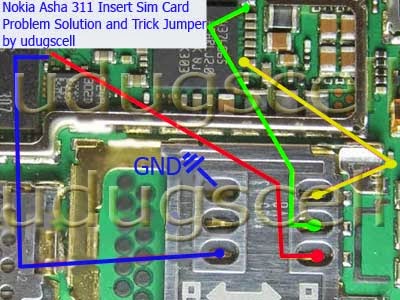
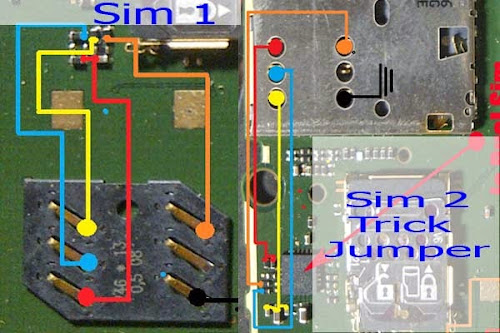
Nokia Asha 311 Insert Sim Card Problem Solution and Trick Jumper Ways

How to repair the damage to the sim card in the Nokia Asha 311? on this occasion udugscell want to discuss about the insert sim card, sim card is not valid, broken sim card and tricks jumper.

Such damage should not we take it to the phone repairman. but with the notes you have equipment like tester tools, solder and tin, screwdriver, and refined to make a jumper cable.
http://udugscell.blogspot.com/2014/12/nokia-asha-311-insert-sim-card-problem.html

How To Make a Jumper

  • Check the voltage on the line as shown above and make sure everything produce voltage.
  • If there is one line does not produce voltage then you have to make a jumper as shown above.
  • If the four lines has produced a voltage then please try to insert sim card and turn on the cell phone.
Maybe it's just information from udugscell about Nokia Asha 311 Insert Sim Card Problem Solution and Trick Jumper Ways. I hope this guide can be useful for you all

Thursday, December 18, 2014

Nokia Asha 200 Microphone Problem and How to Make Jumper

How to repair the damage to the microphone on the phone Nokia Asha 200? following we will describe manually repair guide on Nokia phones. you need to take is to look at the picture below and follow some of the instructions that we provide.
http://udugscell.blogspot.com/2014/12/nokia-asha-200-microphone-problem-and.html

Nokia Asha 200 Repair Instructions

  • First you have to remove the mic from the pcb board measuring the voltage on the red line. if the red line produces normal stress then please change the mic.
  • Second please check the component in the blue circle. you try to replace one by one.
Make sure you keep referring to the drawings and instructions that we have provided above. This guide also supports microphone damage like our voices are not heard by others as well as our voice broken on someone else's phone.

The only clue how to repair the damage to the microphone at the Nokia Asha 200 which we can share to you all. I hope the above guidelines can help you trouble.

Friday, August 29, 2014

Nokia Asha 210 Insert Sim Card Problem Solution and Trick Jumper

Nokia Asha 210 Insert Sim Card Problem Solution and Trick Jumper --- Do you ever find a problem on a mobile Nokia asha 210 insert sim card, sim card is invalid, corrupted sim card. if you ever come across a problem like this should not be confused first, because Analysis Of Mobile wants to share tips and tricks on how to jumper insert sim card on Nokia Asha 210.

Here is a diagram of how to jumper ic sim card in the Nokia Asha 210. trick ic jumper, sim card line jumper.
http://udugscell.blogspot.com/2014/08/nokia-asha-210-insert-sim-card-problem.html


How to Jumper Sim Card IC On Nokia Asha 210
  • Check the fifth leg in the socket and make sure there is a normal flow
  • Check IC sim card, if it is damaged please make jumpers as shown above
  • If there is a valid sim then the problem is in the software. solution please re-program your phone.
So that we can deliver a solution this time. hopefully the tips and tricks sim card IC jumper ways this can help you trouble. good luck

Wednesday, April 2, 2014

Nokia Asaha 303 Insert Sim Card Problem Solution

Nokia Asaha 303 Insert Sim Card Problem Solution  --- Long we did not make the latest tricks in the world of gadgets. would little be bored for you because no updates from my blog. therefore we are sorry for it all. certainly very tedious when you receive a warning on the screen Nokia Asha 303 ​​insert sim card or any sim card is wrong. you will surely look panicked after the screen message, and therefore we want to try to provide a solution for you. well on this occasion udugscell want to share information about tips and tricks how to solve Nokia Asha 303 ​​insert Sim Card. as well as a solution to repair the damage will be presented. complete the following information along with a picture where you can easily understand.
The Following Steps to Resolve the Nokia Asha 303 ​​Insert Sim Card
  • Checks if the sim card has been properly attached to the socket.
  • Try to do the change sim card (this often happens when your SIM card is actually already dead)
  • Check all five lines on the card socket. make sure that the five lines provide a good flow.
  • If there is no change of the Nokia Asha 303 ​​then please you to try replace the resistor as shown above.
  • Last solution you try to give a little warm on the IC and if there is a replacement for the IC should replace direct.
Warning
"Do not get too hot when you do rehot the IC, this will result in your phone totally dead"

That's all the tips and tricks of udugscell on how to fix the problem insert sim card on the Nokia Asha 303​​. I hope you are successful with the above way, we hope you are not bored to more frequently visit our blog. we will give you tips and tricks that may be different from the others. thank you.

Thursday, February 20, 2014

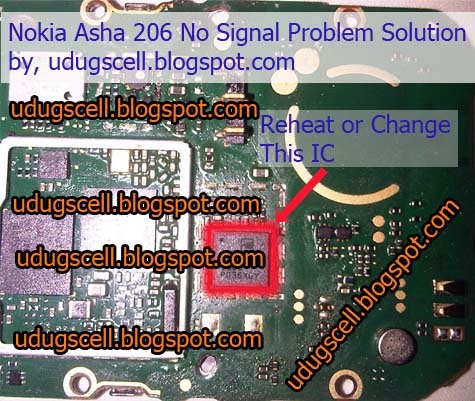
Nokia Asha 206 Signal or Network Problem Solution

Nokia Asha 206 Signal or Network Problem Solution --- Information for mobile technicians that might help. Okay here udugscell want to share tips and tricks on how to fix the Nokia Asha 206 no signal. There are many things that can cause the phone can not emit a signal such as Ic is broken, antennas and signal path is cut. The trick now for the problems in the IC. The following guide for troubleshooting signal on Nokia Asha 206.
http://udugscell.blogspot.com/2014/02/nokia-asha-206-signal-or-network.html
Cause no signal or a weak signal on Nokia phones
  • Splash of water or a cell phone into the water.
  • Posel often fall
  • When performing battery charging. This often occurs in mobile phones Nokia Asha. one of them in the picture above is no signal because the phone is too long doing is charging the battery.
  • Too long to make calls. when you make calls through mobile phones has exceeded the maximum time will cause damage to the RF IC.

A guide to fix no signal on Nokia phones
  • Check the antenna and make sure it is properly attached
  • Check the signal path is lost, possibly due to flaking
  • Give hot on the RF IC 7188. usually if the damage is not too then this can help restore good signal.
  • Replace the IC RF7188. you can take the IC to another phone or to buy a new one.
Thus information tips and tricks on how to cope with no signal on the Nokia Asha 206. In the image above is also support for network problem, low signal, the signal is lost, the signal path is broken, damaged signal IC, and how to replace the IC. I hope the information from udugscell can help you to restore the lost signal on the Nokia Asha 206. thank you

Wednesday, February 12, 2014

Nokia 5800 Insert Sim Card Problem Solution

Nokia 5800 Insert Sim Card Problem Solution -- Here we would like to share information about how to fix the problem the sim card on the Nokia 5800. well, please see the image below to complete our guide.

Nokia 5800 Insert Sim Card
  • Check the path to the sim connector. make sure all the lines got voltage
  • Please Try in Re-heat,
  • Please replace the IC
Have a try at home. hopefully guide about Nokia 5800 Insert Sim Card can help you trouble. thank you

Sunday, February 9, 2014

Nokia Asha 206 Display Problem Solution and Trick Jumper Ways

Nokia Asha 206 Display Problem Solution and Trick Jumper Ways --- long time no see you with all my friends, hopefully in a fine state. ok on this occasion udugscell want to share information about how to repair the damage to the display screen on the Nokia Asha 206. This guide also support for blank white screen, the screen does not appear, the problem on the screen, and tricks on how to jumper socket path screen. see the image below to complete damage to the screen of your Nokia Asha 206.
http://udugscell.blogspot.com/2014/02/nokia-asha-206-display-problem-solution.html
Equipment Required
  • Fine wires
  • Tin.
  • Solder.
  • Tester.
  • Scissors
How to Make a Jumper in the Socket Display
  1. Prepare a cable smooth and adjust the length that we will connect its tracks
  2. Heat Tin with solder for attaching fine wires so that it will closely united.
  3. Use a voltage tester to measure the jumper cables.
Tips & Warning
  1. Make sure the jumper cables are connected properly so that it can deliver a good flow.
  2. Make sure that the jumper cables are not connected directly with the other jumper cable.
The only hint of udugscell on how to make a lane jumper socket on the Nokia Asha 206. good luck

Tuesday, January 21, 2014

How to Flashing Nokia Asha 205 with USB Cable Jumper

Here we would like to share the information with you all about how easy to root or flashing Nokia Asha 205. on Nokia Asha 205, there are 2 versions of the firmware, the firmware is actually the same but only on its a different Rm type. to find it, please read the instructions on the Analysis Of Mobile below.
how to flashing nokia asha 205 with usb

Trick Jumper Pinout USB Cable Directly to the Phone Board

  1. Attach the USB cable directly to the phone such as the picture above board. NOTE : make sure the jumper cables are not connected to each other, this will result in your computer cannot identify the mobile
  2. Connect phone to your computer via USB
  3. Select firmware Rm-863 or Rm-862, Nokia Asha adjust the version you are using
  4. Put the firmware such as MCU, PPM, CNT. If you do not have please search first provider of firmware free on google.
  5. When all is done just the way you are right flashing.

Tips and Warning

If you enter the wrong firmware will cause the phone to Local Mode. because I never experienced a firmware error and phone to local mode.

The only information of Analysis Of Mobile on how to flash the Nokia Asha 205 using a USB cable jumper. I hope this information can help you trouble.

Thursday, September 26, 2013

Nokia Asha 202 Not Charging, Charging Not Supported Problem Solution and Trick Jumper Ways

Not Charging --- When you try to charge the battery on the Nokia Asha 202 and get no response or no fill then this is often caused by the connector may be damaged, disconnected lines, fuses disconnected or does not deliver flow properly and the defective IC. when you encountered problems like this then you may to try the trick of Analysis Of Mobile below.

Repair Instructions on Nokia Asha 202 Not Charging

  • Check the connectors
  • Check the charging line
  • Check the fuses
  • Check the resistor and capacitor associated with charging line
  • Check the charging IC
Tips :
  • When the connector is there much rust solution is to replace
  • If broken lane charging solution is to make a point jumper
  • If the fuse is damaged or can not provide in the current solution is to make a jumper
  • When the screen displays charging your phone does not support then the solution is to remove the IC as shown above
The only tips Analysis Of Mobile on how to repair the damage at the point of charging the Nokia Asha 202. good luck

Monday, September 23, 2013

Nokia X2-00 Screen Cannot Display and Trick Jumper Ways

LCD Display Problem Solution --- If you're having trouble looking for an appearance on Nokia X2-00. and If you're having trouble then allowed to try the trick of Analysis Of Mobile below. on this occasion we would like to share tips and tricks on how to fix the white screen, no display on the Nokia X2-00. the picture below is the instructions on how to jumper from the LCD connector Go to IC and IC jumper ways
Pictured above is a line LCD on Nokia X2-00. if one of them is lost then please make a jumper. Such damage usually causes a white screen and no display at all. good luck

Sunday, September 22, 2013

Nokia X2-01 Insert Sim Card Problem Solution and Trick IC Jumper

Nokia X2-01 Insert Sim Card Problem Solution and Trick IC Jumper --- Insert sim card problem on Nokia X2-01 may be caused by some damage such as broken line, damaged connectors and IC damaged. on this occasion Analysis Of Mobile wants to share tips and tricks on how to repair the damage path sim card on Nokia X2-01. to make improvements like make jumper please see the picture below.

How to solve insert sim card continuously on Nokia X2-01

  • Check sim connector (if damaged please replace, be careful in doing because plastic sim connector that can melt when exposed to heat)
  • Check the sim lines, usually three lines we give the line is often interrupted. if there is broken you have to make a jumper solution (see picture above to do the job)
  • Remove enough for you to solve the IC then make jumper as shown above.
Thank you for visiting Analysis Of Mobile blog that discusses the problem insert sim card on Nokia X2-01. the trick above can be used for sim card registration failed, incorrect sim card. sim not valid. we hope the instructions above can help you trouble. good luck

Saturday, September 21, 2013

Nokia 100 & 101 Signal or Network Problem Solution and Trick Jumper Ways

Nokia 100 & 101 Signal or Network Problem Solution and Trick Jumper Ways --- Nokia 100 or 101 can not be a network problem, the signal is weak or nonexistent. If in Nokia 100 or 101 you do not have a network of low signal problem then you can solve this problem with several steps as indicated by the Analysis Of Mobile in the diagram below. picture below define how network signal function in Nokia 100 or 101.

Tissue repair instructions or signals on the Nokia 100 & 101

  • Check antenna paths are connected by a resistor. if the resistor is damaged then this fairly easy for us to change.
  • Check the path from the antenna to the IC to the PA.
  • Also check the path of the IC PA headed to the antenna switch. see the picture above.
  • If all lines in a normal state simply to replace the IC PA or antenna switch. See the picture above
Note: when we replace both component IC should be careful, if you use the heater for removal simply to reduce its volume.

Thank you for visiting Analysis Of Mobile blog that addresses network problems or the signals do not work on the Nokia 100 & 101. hopefully we can be a hint of a reference for you all.

Nokia X3-00 Mic Problem Solution and Trick Jumper Ways

Nokia X3-00 Mic Problem Solution and Trick Jumper Ways --- If your phone's voice can not be heard by others is usually damage around the microphone. when ever our voice can not reach to destination mobile phone or we can not record our own voice in voice recorder of cell phone it means it Mic not working. well, if you find a problem like this does not need to be confused because Analysis Of Mobile has provided a diagram that you can practice right in your garage.

How to fix the microphone on the Nokia X3-00

  • Check the microphone (if you please replace defective)
  • Check the path, see picture for how to check line microphone
  • Check the associated resistors (if there is any damage, please replace with a similar take on other phones)
The only glimpse of the Analysis Of Mobile information about fixing the microphone on the Nokia X3-00. image above support for problem such as: microphone does not work, damaged microphones, microphone problems. hopefully the we have instrucions can useful to you all. thank you

Wednesday, September 18, 2013

Nokia C2-03 Insert Sim Card Problem Solution and Trick Jumper IC

Nokia C2-03 Insert Sim Card Problem Solution and Trick Jumper IC --- On Nokia phones frequent problem insert sim card. when you try to insert a sim card and produce a sim card is not working properly. this kind of damage there are 2 pieces of IC may be damaged. for the solution please follow the instructions in the image of the Analysis Of Mobile below.

How to repair insert sim card problem

  • If Sim 1 is damaged please remove IC then make jumper as shown above
  • If the Sim 2 is the damage you may give re-heat to the IC as shown above, if it does not work then you have to replace the sim IC.
Tricks that we have given hope that helps. I hope you are successful with what we show at this time. thank you.

Nokia N73 White Screen Problem Solution and Trick Jumper Ways

Nokia N73 White Screen Problem Solution and Trick Jumper Ways --- If the white screen and can't loading on the Nokia N73 is usually not on the broken LCD. Such damage can be overcome by making a jumper and remove some components. for more details please see the image below.

Tips Overcome White Screen on Nokia N73

  • Remove components and make jumpers only for Nokia N73 White Screen, No Loading and Hang Problem.
  • Caution: if the white screen but the phone can be loading not apply to the above tricks.
  • If at the time you heard of a faulted phone loading on Nokia N73 usually damaged LCD or IC Appearance.
Thank you for visiting Analysis Of Mobile blog that discusses about Nokia N73 White Screen Problem. hopefully we can help the tricks of the difficulties you.

Tuesday, September 17, 2013

Nokia C5-03 Not Charging Problem Solution and Trick Jumper

Nokia C5-03 Not Charging Problem Solution and Trick Jumper --- Hello pal online wish you all in fine condition today. Analysis Of Mobile disseminate trick this time wanted a simple but very meaningful for novice mobile technicians. As for the issues that we will discuss in this article is how to repair the damage to the charging point on the Nokia C5-03. before we see a picture we will convey little about the causes that lead to damage to the charging path. possible cause is the charging connector is damaged, disconnected lines, fuse cut off, and the IC is damaged. if you have problems like this then you may to try the trick from us.

Repair instructions Nokia C5-03 Not Charging

  • Check the charging connector may be damaged (please replace if totally broken)
  • Check the charging path as the yellow line on the diagram, if you find a breaking point please make jumper as shown above.
  • If charging does not support please delete IC.
That's Analysis Of Mobile can convey to this article. hopefully along with the instructions of our images can be a reference for you all. possible hint of Analysis Of Mobile still many shortcomings therefore we apologize. because of damage to a mobile phone is different.

Nokia Asha 305 Not Charging & Charging Not Supported Problem Solution and Trick Jumper

Nokia Asha 305 Not Charging & Charging Not Supported Problem Solution and Trick Jumper --- Not Charging on Nokia Asha 305 may be caused by some damage such as: IC damaged, broken line, damaged fuses and resistors can also cause damage to the charging path. on this occasion Analysis Of Mobile would like to share with you all the tricks about how to repair the damage to the charging point on the Nokia Asha 305. In this diagram green color line is to identify that charging path of Nokia Asha 305.
Pictured above supported for Bad Contact Charging, Charging Not Supported, Not Charging. The only information on Analysis Of Mobile on instructions on how to repair the damage to the charging point on the Nokia Asha 305. hope that helps

Monday, September 16, 2013

Nokia 1280 & 103 Ringer Buzzer Problem Solution and Trick Jumper Ways

Nokia 1280 & 103 Ringer Buzzer Problem Solution and Trick Jumper Ways --- There is no sound on the Nokia 1280 or 103 there is some damage that you should know such as, speaker broken, disconnected lines, damaged resistors, IC broken even software can affect speaker not work. on this occasion Analysis Of Mobile wants to share information about ring tones do not work on a Nokia 1280 or 103. please see the following trick.

Instructions on Repairing Nokia 1280 or 103 Can't Loudspeakers

  • Check the Speaker (if this was damaged please replace)
  • Check the line (if it broke please make jumper as shown above)
  • Check the IC (you can remove)
  • If steps 1 through 3 are all in good condition. The possibility of the software that has been damaged. if the software that is damaged please you try to reset the phone nokia 1280 or 103 back to factory settings by the default code 12345.
  • If step 1 through 4 does not work then you have to upgrade the phone software. to do this you have to have a box in which to re-flash your phone and you must be have firmware RM-647.
Thanks you for visiting this blog Analysis Of Mobile ringtones are not working, trouble buzzer, speaker faulty, Nokia no sound and can't loudspeaker. you may want to try our other tricks on Nokia X2-00 Insert Sim Card Problem Solution and Trick Jumper Ways. good luck

Sunday, September 15, 2013

Nokia X2-00 Insert Sim Card Problem Solution and Trick Jumper Ways

Nokia X2-00 Insert Sim Card Problem Solution and Trick Jumper Ways --- A cell phone can not insert sim card or always insert sim card when you have to insert the card into the phone Nokia X2-00 is a path of damage such as breaking the connector to the IC, when phone is too damp can cause rust on the IC. of the problems we mentioned above we do not need to make a replacement IC but only made ​​a few jumper wires as shown below. ok on this occasion Analysis Of Mobile has provided guidance in the form of drawings on how to make a jumper for problem insert sim card on the Nokia X2-00.
Difficulty :
Moderate
Nokia X2-00

Repair Instructions

  • Check the path as shown above (red line)
  • Remove IC (quite solved only IC
  • Before making a jumper you should trim the legs of the IC
  • Make jumper as shown above
Tips
  • Be careful in making sure the jumpers and jumper cables are connected correctly
  • Make sure that the path is not in contact with another track path, this will be a short-circuit and will not change the condition of your phone damage
Thank you for visiting the blog Analysis Of Mobile who have been sharing information about the Nokia X2-00 Insert Sim Card Problem Solution. do not miss a trick we were before this on How to Hard Reset Samsung Galaxy Young. This article could be useful for you, and we hope so. good luck
Related Posts Plugin for WordPress, Blogger...